Quick Summary: Bybit supports crypto deposits (free), fiat deposits via card/P2P/bank transfer, and crypto withdrawals with fixed network fees. The cheapest deposit method is a crypto transfer via BEP-20 ($1 flat fee). This guide covers every deposit and withdrawal method available in 2026 — with step-by-step instructions, a complete fee table, and the most common mistakes to avoid.
1. Bybit Deposit & Withdrawal: What You Need to Know First
Bybit is one of the world’s largest crypto derivatives and spot exchanges, with over 50 million registered users as of 2026. Whether you’re funding a new account or cashing out your profits, understanding how money flows in and out of Bybit is essential.
Here’s the most important thing to understand upfront: Bybit does not charge deposit fees for on-chain crypto transfers. You pay only the blockchain network fee originating from the sending wallet or exchange — not a platform fee from Bybit’s side. For withdrawals, Bybit charges a fixed network fee that varies by coin and blockchain selected.
There are three core principles to follow every time you move funds on Bybit:
Always match the network. When you deposit ETH via ERC-20, you must also withdraw to an ERC-20 compatible address. Sending tokens via the wrong network is the single most common cause of permanently lost funds in crypto. Bybit cannot recover funds sent via an incorrect network.
Always withdraw from your Funding Account. Bybit uses multiple internal sub-accounts (Unified Trading Account, Earn Account, etc.). Withdrawals can only be initiated from the Funding Account. If your balance shows zero in the withdrawal screen, your funds are likely sitting in another account type and must be transferred internally first.
KYC level determines your withdrawal ceiling. An unverified account is capped at 20,000 USDT per day and 100,000 USDT per month. Completing Level 1 KYC removes the monthly cap and raises the daily limit to 1,000,000 USDT. For serious traders, completing KYC is non-negotiable.
2. Before You Start: Checklist
Before initiating any deposit or withdrawal on Bybit, confirm the following:
Account requirements:
- Bybit account registered and logged in
- Email or phone verification completed (required at registration)
- 2FA (Two-Factor Authentication) enabled — required for all withdrawals
- KYC completed (recommended; required for limits above 20,000 USDT/day)
For deposits:
- Know which coin and network you will send
- Have the correct Bybit deposit address ready (generated fresh in the deposit window)
- Confirm minimum deposit amounts (varies by coin and network)
For withdrawals:
- Confirm the destination address supports the network you plan to use
- Ensure funds are in the Funding Account (not Unified Trading or Earn)
- Check whether the destination address requires a Tag/Memo (XRP, XLM, EOS, ATOM require this)
- If you have address whitelisting enabled, the destination address must be pre-approved (24-hour lock-in applies after adding a new address)
3. How to Deposit on Bybit: All Methods
Bybit supports four primary deposit methods. Each has different costs, speeds, and regional availability. Here is a detailed breakdown of each.
Method 1: Crypto Transfer (Cheapest)
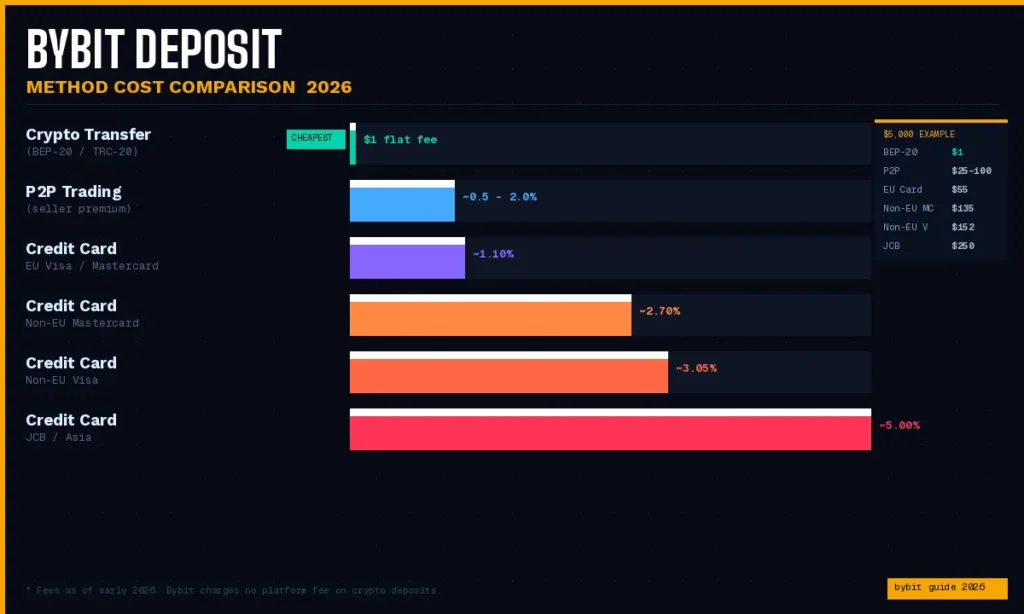
Transferring cryptocurrency from another exchange or wallet directly to Bybit is the most cost-effective funding method available in 2026. Since Bybit charges no deposit fee on its end, you only pay whatever withdrawal fee the sending exchange charges — which on BEP-20 (Binance Smart Chain) is typically a flat $1 USDT regardless of the transfer amount.
Why this method wins on cost:
If you send $10,000 via BEP-20 USDT, your total cost is $1. If you used a credit card to buy directly on Bybit, you would pay 3–6% on that same amount — a difference of $299 to $599.
Step-by-step: How to deposit crypto on Bybit
- Log in to your Bybit account
- Click Assets (top right) → Deposit
- Select the coin you want to deposit (e.g., USDT)
- Select the network you will send from (e.g., BEP-20 / BSC)
- Copy the deposit address that appears — this is your Bybit receiving address
- Go to your sending exchange or wallet
- Initiate a withdrawal to that address, selecting the exact same network
- Wait for blockchain confirmations (typically 1–30 minutes depending on network)
Required confirmations by network (approximate):
| Network | Confirmations Required | Typical Time |
|---|---|---|
| BEP-20 (BSC) | 15 | 30–60 seconds |
| TRC-20 (Tron) | 20 | 1–3 minutes |
| ERC-20 (Ethereum) | 12 | 3–10 minutes |
| Solana (SOL) | 1 | Under 30 seconds |
| Bitcoin (BTC) | 1 | 10–60 minutes |
| Arbitrum One | 15 | Under 1 minute |
Critical warning: Always generate a new deposit address within the Bybit deposit window each time. Do not reuse old addresses from screenshots or bookmarks, as Bybit may rotate addresses. Sending to an outdated address can delay crediting, though Bybit generally recovers such deposits through a support ticket process.
Method 2: Credit / Debit Card
Bybit’s Buy Crypto feature allows you to purchase cryptocurrency directly using a Visa, Mastercard, Apple Pay, or Google Pay through third-party payment providers (Banxa, MoonPay, and regional partners).
This is the fastest way to get crypto into Bybit — funds typically arrive within 5–10 minutes — but it is by far the most expensive option due to processor fees.
Credit card fees on Bybit (2026):
| Region | Card Type | Fee |
|---|---|---|
| European Union | Visa / Mastercard | ~1.10% |
| Non-EU | Visa | ~3.05% |
| Non-EU | Mastercard | ~2.70% |
| Asia | JCB | ~5.00% |
Note: The exact rate and final amount you receive are shown at checkout before you confirm. The fee percentage displayed is the all-in rate including both the provider fee and any conversion spread.
Step-by-step: How to buy crypto via card on Bybit
- Log in to Bybit
- Click Buy Crypto → One-Click Buy
- Select the cryptocurrency you want to buy (USDT, BTC, ETH, etc.)
- Enter your spending amount in your local fiat currency
- Select your payment method (Visa, Mastercard, Apple Pay, Google Pay)
- Review the rate and fee shown on the checkout page
- Complete the third-party provider’s verification (ID may be required on first use)
- Crypto lands in your Bybit account within 5–10 minutes
Common issue: Many traditional banks decline crypto-related card transactions. If your card is declined, try a different card or use Apple Pay / Google Pay, which tend to have higher success rates. Challenger banks (Revolut, Monzo, Starling) typically work better for crypto purchases than traditional banks.
Method 3: P2P Trading
Bybit’s peer-to-peer (P2P) marketplace connects buyers and sellers directly, allowing you to purchase cryptocurrency using local payment methods — including bank transfer, mobile payment apps, and digital wallets that are not available through standard fiat rails.
P2P is particularly useful for users in regions where direct fiat deposits are unavailable, or for users who want to avoid card fees. The price is set by the seller, so you may pay a small premium above the spot rate (typically 0.5–2%), but Bybit itself does not charge a platform fee for P2P trades on either side.
Supported P2P payment methods (varies by region):
- Bank transfer (local)
- PayPal (selected regions)
- Alipay / WeChat Pay (China)
- UPI / IMPS (India)
- Wise
- Revolut
- GCash (Philippines)
- M-Pesa (Africa)
- And dozens of others depending on your country
Step-by-step: How to buy crypto via P2P on Bybit
- Log in to Bybit
- Navigate to Buy Crypto → P2P Trading
- Select the coin you want to buy and your fiat currency
- Browse available sellers — filter by payment method, price, and limit
- Select a seller and click Buy
- Follow the payment instructions shown on-screen
- Send the fiat payment to the seller via the selected payment method
- Click Payment Sent to notify the seller
- Once the seller confirms receipt, Bybit releases the crypto from escrow to your account
Important: Bybit holds the seller’s crypto in escrow during the transaction. Never mark payment as sent before actually sending it. Only pay through the payment method and account details shown in the P2P window — not through external channels. Bybit’s customer support cannot recover funds lost to P2P scams where payment was made outside the platform.
Method 4: Bank Transfer / SEPA (EU Only)
For users in the European Economic Area (EEA), Bybit offers fiat deposits via SEPA bank transfer through e-money partners. This method is available in euros and is one of the cheapest deposit options for European users — in many cases, the Bybit platform fee for SEPA is zero, with only minor partner fees potentially applying.
SEPA deposits typically settle same-day if sent before the bank cut-off time, or the next business day.
Availability: SEPA deposits are limited to EEA residents with euro-denominated bank accounts. UK users may have GBP-specific options. Users outside the EU/EEA generally do not have access to direct bank transfer deposits and should use Method 1 (crypto transfer) or Method 3 (P2P) instead.
Step-by-step: How to deposit via bank transfer
- Log in to Bybit
- Go to Assets → Deposit → Fiat Deposit
- Select your currency (EUR, GBP, etc.)
- Select Bank Transfer as the payment method
- Review the fee displayed in-flow
- Follow the SEPA transfer instructions shown (including reference number — do not omit this)
- Initiate the transfer from your bank
- Funds credited to your Bybit account within same day to T+1
4. Bybit Deposit Fees: Complete Table 2026
| Deposit Method | Platform Fee (Bybit) | Third-Party Fee | Speed |
|---|---|---|---|
| Crypto transfer (on-chain) | Free | Network fee from sender | 30 sec – 60 min |
| Credit card (EU Visa/MC) | 0% | ~1.10% (provider) | 5–10 min |
| Credit card (Non-EU Visa) | 0% | ~3.05% (provider) | 5–10 min |
| Credit card (Non-EU MC) | 0% | ~2.70% (provider) | 5–10 min |
| Credit card (JCB Asia) | 0% | ~5.00% (provider) | 5–10 min |
| P2P | Free | 0–2% (seller premium) | 5–30 min |
| SEPA bank transfer (EU) | Free | Minor partner fee (if any) | Same day – T+1 |
5. How to Withdraw from Bybit: Step-by-Step
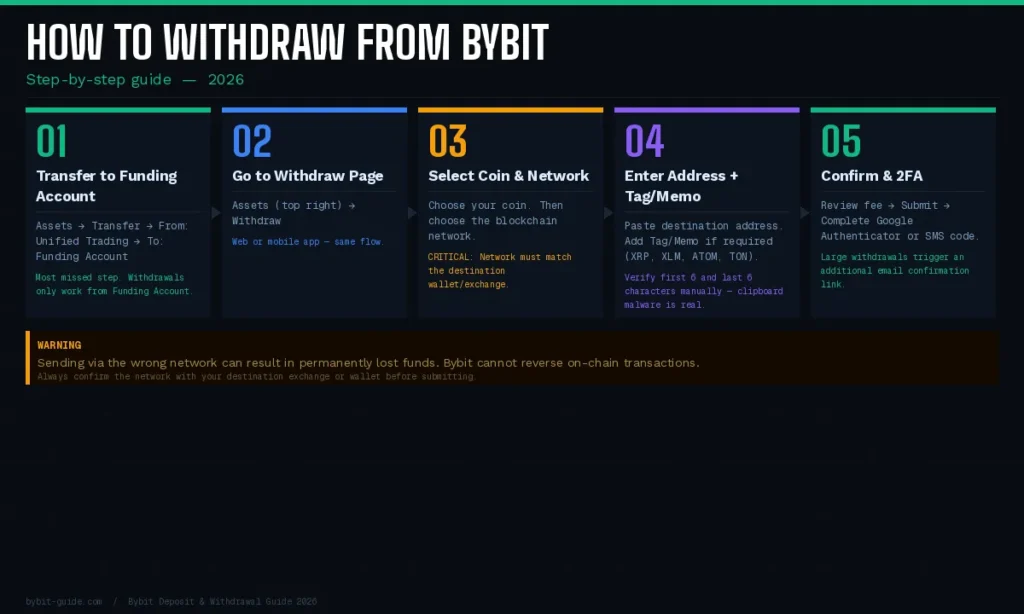
Withdrawing from Bybit means sending your crypto out to an external wallet, another exchange, or a hardware wallet. The process is straightforward, but the network selection step requires careful attention. Follow these steps exactly.
Step 1: Transfer Funds to Your Funding Account
This is the step most users miss. Bybit uses multiple account types internally:
- Unified Trading Account (UTA): Where spot, futures, and options trading happens
- Earn Account: Where staking, savings, and liquidity mining rewards accumulate
- Funding Account: The only account from which external withdrawals can be initiated
If your funds are in the UTA or Earn Account, you must transfer them to the Funding Account before withdrawing.
How to do this:
- Go to Assets → Transfer
- Set From: Unified Trading Account (or Earn Account)
- Set To: Funding Account
- Enter the amount and click Confirm
This is a free internal transfer and settles instantly.
Step 2: Navigate to the Withdrawal Page
- Log in to Bybit (web or app)
- Click Assets (top right of the web interface)
- Click Withdraw
- On mobile: tap the Assets tab → Withdraw
Step 3: Select Coin and Network
- In the Coin field, select the cryptocurrency you want to withdraw (e.g., USDT)
- In the Network field, select the blockchain network
This is the most critical step. The network you select must match the network supported by your receiving wallet or exchange. If you send USDT via TRC-20 to a wallet that only supports ERC-20, your funds will be lost and cannot be recovered by Bybit.
Before selecting a network, always confirm with the destination exchange or wallet which networks they support for that specific coin. Most major exchanges support TRC-20, BEP-20, and ERC-20 for USDT — but not all support all three.
The fee for each network is displayed in the withdrawal window once you select it. Check this before confirming.
Step 4: Enter Withdrawal Address
- Paste the destination wallet address into the Address field
- If the coin requires a Tag/Memo (XRP, XLM, EOS, ATOM, TON), enter it in the separate Tag/Memo field
- Double-check the address character by character — once a withdrawal is submitted, it cannot be recalled
Coins that require a Tag/Memo:
- XRP (Ripple) — requires Destination Tag
- XLM (Stellar) — requires Memo
- EOS — requires Memo
- ATOM (Cosmos) — requires Memo
- TON — requires Comment/Memo
- HBAR — requires Memo
Sending to a Bybit-internal address (another Bybit user)? Use Internal Transfer instead — it’s free and instant.
Step 5: Enter Amount and Confirm
- Enter the amount you want to withdraw
- Review the Withdrawal Fee and Amount Received shown below the input field
- By default, Bybit deducts the fee from your withdrawal amount. You can change this in Set Up to “Amount Received = Amount Entered” mode (in which case your balance must cover the fee separately)
- Click Submit
- Complete 2FA verification (Google Authenticator or SMS code)
- For large withdrawals, Bybit may send an email confirmation link — check your inbox and click to approve
Your withdrawal will appear in Assets → History → Withdraw with one of the following statuses:
| Status | Meaning |
|---|---|
| Under Review | Submitted, pending Bybit’s internal review |
| Withdrawal In Progress | Approved, being broadcast to the blockchain |
| Sent | Transaction submitted; awaiting blockchain confirmation |
| Withdrawal Completed | Confirmed on-chain; funds delivered |
| Canceled | Canceled by user |
| Rejected | Declined by Bybit (contact support for reason) |

6. Bybit Withdrawal Fees: Complete Network Fee Table 2026
Bybit applies a fixed, flat fee per withdrawal — not a percentage. This means whether you withdraw $100 or $100,000, the fee is the same amount.
Important: Fees are adjusted periodically based on network congestion. The figures below reflect standard conditions as of early 2026. Always verify the exact fee in the withdrawal window before confirming.
USDT Withdrawal Fees by Network:
| Network | Withdrawal Fee | Min. Withdrawal | Speed |
|---|---|---|---|
| TRC-20 (Tron) | 1 USDT | 10 USDT | 1–5 min |
| BEP-20 (BSC) | 1 USDT | 10 USDT | 30–60 sec |
| Solana (SOL) | 1 USDT | 10 USDT | Under 30 sec |
| Arbitrum One | 1 USDT | 10 USDT | Under 1 min |
| Polygon (MATIC) | 1 USDT | 10 USDT | 1–3 min |
| Optimism | 1 USDT | 10 USDT | 1–3 min |
| ERC-20 (Ethereum) | 3–10 USDT | 20 USDT | 3–15 min |
Major Coin Withdrawal Fees:
| Coin | Network | Withdrawal Fee |
|---|---|---|
| BTC | Bitcoin | ~0.0005 BTC |
| ETH | ERC-20 | ~0.005 ETH |
| ETH | Arbitrum | ~0.0003 ETH |
| XRP | Ripple | ~0.25 XRP |
| SOL | Solana | ~0.01 SOL |
| BNB | BEP-20 | ~0.0005 BNB |
| DOGE | Dogecoin | ~5 DOGE |
Key insight: For USDT withdrawals, TRC-20, BEP-20, Solana, and Arbitrum all cost approximately $1 flat. Ethereum’s ERC-20 costs $3–10 depending on gas prices. Unless the destination requires ERC-20, always use a lower-cost network.
7. Bybit Withdrawal Limits by KYC Level
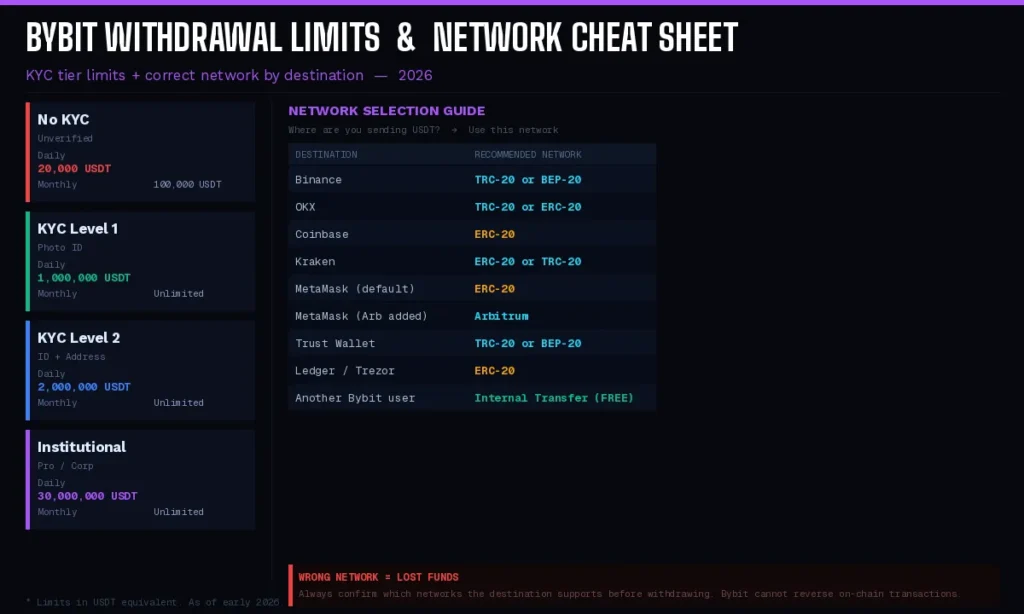
Bybit uses a tiered withdrawal limit system, ranging from non-KYC users all the way up to advanced VIP and Pro accounts. Your daily and monthly limits are determined by your KYC verification level, not just your VIP trading tier.
| KYC Level | Daily Limit | Monthly Limit |
|---|---|---|
| No KYC (Unverified) | 20,000 USDT | 100,000 USDT |
| KYC Level 1 | 1,000,000 USDT | Unlimited |
| KYC Level 2 | 2,000,000 USDT | Unlimited |
| Pro / Institutional | Up to 30,000,000 USDT | Unlimited |
What KYC Level 1 requires:
- Government-issued photo ID (passport, national ID, or driver’s license)
- A selfie with the ID
- Processing time: 15 minutes to 48 hours
- Up to 5 attempts per day allowed if rejected
What KYC Level 2 additionally requires:
- Proof of address (utility bill, official bank statement, or tax return — not mobile phone bills or bank transaction slips)
- Processing time: 1–5 business days
Recommendation: For most individual users, Level 1 KYC is sufficient. The daily limit of 1,000,000 USDT covers the vast majority of retail and semi-institutional use cases. Complete it before you need it — the verification process can take up to 48 hours and you don’t want to be stuck waiting during a volatile market.
8. How to Choose the Right Network (Critical)
Network selection is where the most costly and irreversible mistakes happen in crypto. Here is a definitive guide to making the right choice every time.
The golden rule: Match the network to what the destination supports — never just pick the cheapest fee.
Step-by-step decision process:
- Identify the destination (e.g., Binance, Coinbase, MetaMask, Ledger)
- Look up which networks that destination supports for your specific coin
- Only then select the matching network on Bybit’s withdrawal screen
- If multiple supported networks overlap (e.g., both TRC-20 and BEP-20 are supported), choose the one with the lower fee
Common network compatibility guide:
| Destination | Recommended USDT Network |
|---|---|
| Binance | TRC-20 or BEP-20 |
| OKX | TRC-20 or ERC-20 |
| Coinbase | ERC-20 (Coinbase has limited TRC-20 support) |
| Kraken | ERC-20 or TRC-20 |
| MetaMask | ERC-20 (Ethereum mainnet) or Arbitrum/Polygon (if added) |
| Ledger / Trezor | ERC-20 (for ETH-based wallets) |
| Trust Wallet | TRC-20 or BEP-20 |
Warning: If the destination is MetaMask and you have not manually added the BEP-20 or Polygon network, your MetaMask only shows ERC-20 assets. Sending BEP-20 USDT to a default MetaMask address will result in the funds being invisible (not lost, but requiring a manual network add to access). Always confirm the exact network configuration of your receiving wallet.
9. Cheapest Way to Deposit and Withdraw on Bybit
Based on current 2026 fee structures, here is the most cost-efficient path for both depositing and withdrawing, assuming you are not in a region with direct fiat rails.
Cheapest deposit method:
- Buy USDT on a fiat-supporting exchange (Coinbase for US/UK, Binance globally, Kraken for EU SEPA users) using your local currency
- Withdraw USDT from that exchange to Bybit via BEP-20 network
- Total cost: The BEP-20 withdrawal fee from the sending exchange — typically $1 USDT, regardless of how much you send
This method is effective at any deposit size. The $1 flat fee on a $10,000 transfer represents a 0.01% effective cost — vs. 3–5% on a direct card purchase.
Cheapest withdrawal method:
For USDT withdrawals, use TRC-20, BEP-20, Solana, or Arbitrum — all charge approximately $1 flat. Avoid ERC-20 unless the destination requires it, as Ethereum gas fees can push the withdrawal cost to $3–10 USDT.
Cost comparison example: $5,000 USDT transfer
| Method | Cost | Effective Rate |
|---|---|---|
| Crypto transfer via BEP-20 | $1.00 | 0.02% |
| P2P (typical seller premium) | $25–100 | 0.5–2% |
| Credit card (Non-EU Mastercard) | $135 | 2.70% |
| Credit card (Non-EU Visa) | $152.50 | 3.05% |
| Credit card (JCB Asia) | $250 | 5.00% |
10. How to Withdraw from Bybit to a Bank Account
Bybit doesn’t directly send money to your bank account in most regions. There is no “bank wire out” button for users outside the EU. Here is the practical workaround that most users follow:
Option A: Crypto out → Fiat exchange → Bank (Global method)
- Withdraw USDT from Bybit to an exchange that supports fiat withdrawals (Coinbase, Kraken, Binance)
- Sell USDT on that exchange for your local currency (USD, EUR, GBP, KRW, etc.)
- Withdraw the fiat balance to your bank account from that exchange
- Timeline: 1–3 business days total depending on your region and bank
This is the standard path for users in the US, Asia, and most non-EU countries. The one-way cost is approximately $1 (BEP-20 withdrawal from Bybit) plus any selling spread or withdrawal fee on the receiving exchange.
Option B: Bybit P2P → Bank (Direct fiat method)
- Go to Buy Crypto → P2P Trading → switch to Sell tab
- List or respond to a buy offer in your local currency
- Receive payment directly from the buyer to your bank account
- Release the crypto to the buyer once payment is confirmed
This avoids the intermediate exchange step entirely. The effective rate depends on the P2P market depth in your region and currency. In liquid markets, you can sell at rates very close to the spot price.
Option C: EU users — Direct SEPA Withdrawal
If you are in the EEA and Bybit’s fiat withdrawal option is enabled for your country, you can withdraw EUR directly to your bank account via SEPA. Check Assets → Fiat Withdrawal to see if this option is available for your account and region.
11. Internal Transfer: Zero-Fee Option
If you need to move funds to another Bybit user — a business partner, a family member, or a sub-account — use Bybit’s Internal Transfer feature. It is completely free and instant, with no blockchain network fees involved.
How to use Internal Transfer:
- Go to Assets → Withdraw
- Select Internal Transfer
- Enter the recipient’s Bybit UID (User ID) or registered email address
- Select the coin and amount
- Confirm the transfer
No withdrawal fee is charged for Internal Transfers. This is significantly cheaper than an on-chain transfer for the same amount, especially for smaller sums where the flat network fee represents a larger percentage of the total.
12. Bybit Deposit & Withdrawal: Processing Times
| Action | Method | Typical Time |
|---|---|---|
| Deposit | BEP-20 / BSC | 30–60 seconds |
| Deposit | Solana | Under 30 seconds |
| Deposit | TRC-20 (Tron) | 1–3 minutes |
| Deposit | Arbitrum | Under 1 minute |
| Deposit | ERC-20 (Ethereum) | 3–15 minutes |
| Deposit | Bitcoin | 10–60 minutes |
| Deposit | Credit card | 5–10 minutes |
| Deposit | P2P | 5–30 minutes |
| Deposit | SEPA (EU) | Same day to T+1 |
| Withdrawal | Standard | Up to 15 minutes |
| Withdrawal | High network congestion | Up to several hours |
| Withdrawal | Large amount (manual review) | Up to 24 hours |
| Internal Transfer | Any coin | Instant |
About the “Under Review” status: For new accounts, first-time large withdrawals, or accounts that triggered a risk flag, Bybit may hold a withdrawal for manual review. This is a security measure, not an error. If your withdrawal has been under review for more than 24 hours, contact Bybit support via live chat.
13. Common Deposit & Withdrawal Errors (And How to Fix Them)
Problem: Deposit not credited after 1+ hours
Possible causes and solutions:
- Wrong network selected: If you sent via a different network than what was shown on Bybit’s deposit page, the funds may be recoverable through a support ticket. Bybit has a recovery service for common misrouted deposits, though this may take days and may involve a recovery fee.
- Insufficient confirmations: Some networks take longer under congestion. Check the blockchain explorer (e.g., Etherscan, BscScan, Tronscan) using your transaction hash (TXID) to see confirmation status.
- Below minimum deposit amount: Deposits below the minimum threshold for a given network may not be credited automatically. Contact support with the TXID.
Problem: “Invalid Code” error during 2FA on withdrawal
This happens when the date or time on the 2FA code-generating device is incorrect. Fix it by syncing your phone’s time automatically via Settings → Date & Time → Automatic. On iOS: Settings → General → Date & Time → Set Automatically.
Problem: Zero balance shown in withdrawal screen
Your funds are in a different Bybit account type. Go to Assets → Transfer and move funds from the Unified Trading Account or Earn Account to the Funding Account before attempting to withdraw.
Problem: Withdrawal stuck at “Withdrawal In Progress” for hours
This is usually a blockchain congestion issue, not a Bybit problem. Use the TXID from Assets → History → Withdraw to check the transaction status on the relevant blockchain explorer. If the TXID is not yet showing, the transaction may still be in Bybit’s queue — contact support if it exceeds 24 hours.
Problem: Sent funds to wrong address
Unfortunately, on-chain crypto transactions are irreversible. Once a transaction is confirmed on the blockchain, Bybit cannot reverse it or retrieve the funds. This is why triple-checking the destination address before confirming is essential. For funds accidentally sent to a Bybit corporate address (rare edge case), submit a support ticket with the TXID immediately.
Problem: “Exceeds Available Balance” when clicking All
This occurs when you have selected “Withdrawal Amount Entered = Amount Received” mode. In this mode, clicking All will show an error because your balance doesn’t cover the amount plus the fee. You need to manually enter the amount minus the withdrawal fee, or switch to the default “Deduct Fee from Withdrawal Amount” mode.
14. Bybit Deposit & Withdrawal: Security Tips
Enable address whitelisting. Bybit allows you to whitelist specific withdrawal addresses, so that funds can only be withdrawn to pre-approved addresses. While this adds friction for new withdrawals (24-hour waiting period), it significantly reduces the risk of unauthorized withdrawals if your account is ever compromised.
Use Google Authenticator over SMS 2FA. SMS-based 2FA is vulnerable to SIM-swapping attacks. Google Authenticator (or Authy) is significantly more secure. Set it up in Account Security settings.
Do not share your UID publicly. While your UID alone cannot be used to steal funds, sharing it broadly can expose you to social engineering attempts.
Verify the destination address on-screen, not just by pasting. Some malware (clipboard hijackers) replaces copied crypto addresses with attacker-controlled addresses. After pasting the destination address, manually verify at least the first 6 and last 6 characters against the source.
Never withdraw to an address provided by someone claiming to be Bybit support. Bybit’s official support will never ask you to withdraw funds to a specific address. This is universally a scam.
Use email confirmation for large withdrawals. Bybit sends an email confirmation link for large withdrawal amounts. Ensure your email account itself is secured with a strong password and 2FA, as this is a key part of the withdrawal security chain.
15. Frequently Asked Questions (FAQ)
Q: Does Bybit charge a deposit fee?
A: For on-chain crypto deposits, Bybit charges no platform fee. You pay only the network fee from the sending wallet or exchange. For fiat deposits via card, the third-party payment provider charges a fee (1.1–5% depending on card type and region). P2P and SEPA deposits have minimal or no Bybit platform fees.
Q: What is the minimum deposit on Bybit?
A: There is no stated minimum for crypto deposits, but Bybit recommends checking the minimum deposit amount for each coin and network on the Deposit/Withdrawal Status page. Deposits below the minimum may not credit automatically. For USDT on TRC-20 or BEP-20, typical minimum is around 10 USDT.
Q: Can I withdraw from Bybit without KYC?
A: Yes — you can withdraw with a daily limit of 20,000 USDT per day even without KYC. However, you will be barred from exploring Bybit’s fullest features, including spot trading. Completing Level 1 KYC raises the daily limit to 1,000,000 USDT and removes the monthly cap.
Q: How long does a Bybit withdrawal take?
A: Instant withdrawal may take up to 15 minutes to process. However, please note that in the event of high network congestion, withdrawals may take a longer time to process. Bitcoin withdrawals on the native BTC network can take 10–60 minutes depending on block confirmation times.
Q: What happens if I send crypto via the wrong network?
A: If the destination address is incompatible with the network used, the funds may be lost or stuck. For funds misrouted to a Bybit deposit address (i.e., you sent via the wrong network to your own Bybit deposit address), there is a recovery process via customer support, though it may take days and a recovery fee may apply. If sent to an external address that doesn’t support the network, recovery depends on whether you control that wallet’s private keys.
Q: Can I withdraw USDT to a bank account directly?
A: In most regions, no. Bybit does not support direct fiat bank wire withdrawals outside of selected EU countries. The standard workaround is: withdraw USDT to a fiat-supporting exchange (Coinbase, Kraken, Binance), sell for fiat, then withdraw to your bank.
Q: What is the cheapest network for USDT withdrawal?
A: Choosing alternative networks like Tron or BEP-20 for USDT transfers can significantly reduce fees. TRC-20, BEP-20, Solana, and Arbitrum all charge approximately 1 USDT flat. ERC-20 can cost $3–10 depending on Ethereum gas prices. Always use the cheaper network unless the destination specifically requires ERC-20.
Q: Does Bybit require Tag/Memo for all coins?
A: No. Only specific coins require a Tag/Memo: XRP, XLM, EOS, ATOM, TON, and HBAR. For these coins, omitting the Tag/Memo when sending to an exchange (not a private wallet) can result in the funds not being credited to your account on the receiving side. Always check with the destination exchange whether they require a Tag/Memo before sending.
Q: What is Bybit’s Internal Transfer and is it free?
A: There is no withdrawal fee charged for Internal Transfer. It allows instant, zero-fee transfers between Bybit users or between your own sub-accounts. Navigate to Assets → Withdraw → Internal Transfer and enter the recipient’s UID or email.
Q: Is Bybit safe for large deposits and withdrawals?
A: Bybit holds a majority of assets in cold storage and operates hot wallets for processing withdrawals. The exchange requires TOTP 2FA for sensitive actions, supports passkeys and address whitelists, and publishes a monthly Merkle-tree proof of reserves. For large transfers, using address whitelisting and email confirmation provides an additional layer of security.
This guide is accurate as of March 2026. Bybit’s fee structures, available networks, and regional fiat options are subject to change. Always verify current fees in the withdrawal window before confirming any transaction. This content is for informational purposes only and does not constitute financial advice.